Person In Charge (PICs)
Utilising Safe Work Packs - Overview
Once a Safe Work Pack has been verified and authorised, it's ready to be utilised on-site. This overview covers the complete workflow and structure of Safe Work Packs to help PICs effectively manage their work activities.
Mobile App Required
All Safe Work Pack utilisation activities must be completed on the Accurail mobile app. You cannot use, verify, or complete SWPs using the website.
Download the mobile app:
Core Workflow
The Safe Work Pack utilisation process follows a structured workflow:
Sequential Workflow Steps
Starting Your Shift - Begin your shift to set the SWP to "In Progress" status
Acceptance on Site - Initial acceptance and briefing processes on the F01
RT9909 - Risk assessment and safety briefing documentation
Completion of Work Sign Off - Final sign-off on the F01 Completion of Work Sign off
Sequential Workflow Required: Each step must be completed in order. You cannot edit subsequent sections until the previous step is completed. For example, you cannot edit the RT9909 until you have completed the "Acceptance on Site".
Safe Work Pack Structure
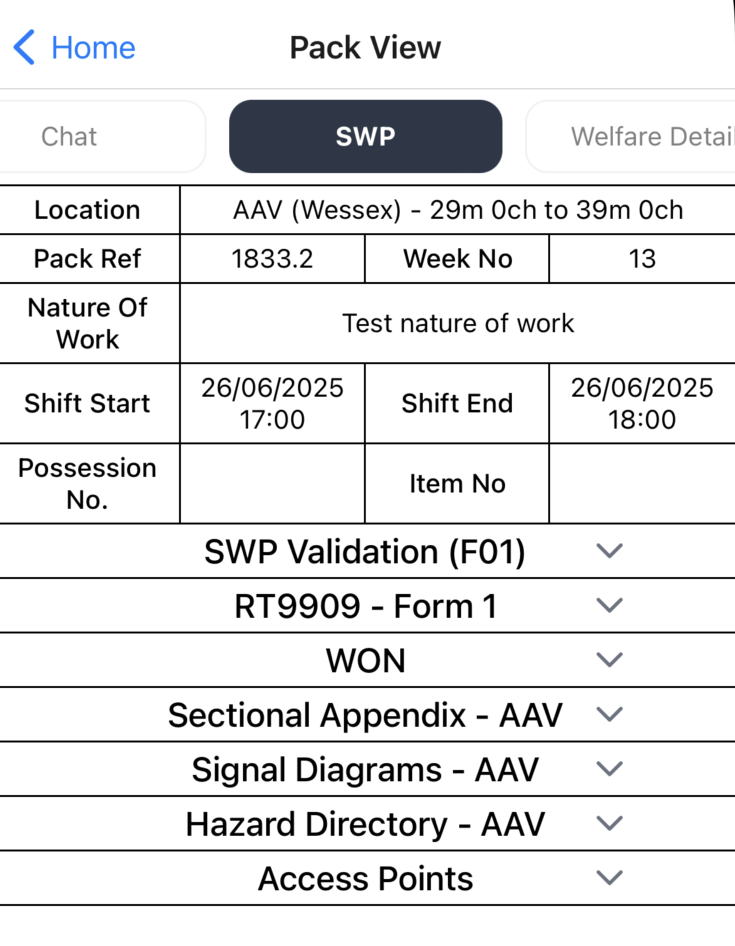
General Overview Section
Every Safe Work Pack contains a general overview with essential information:
- Pack Reference - Unique identifier for the Safe Work Pack
- Possession Details - Possession number and item number (if applicable)
- Location - Detailed work location information
- Shift Times - Start and end times for the work period
Core Documentation Sections
Your Safe Work Pack is organised into the following key sections:
Essential Forms
- F01 (SWP Validation) - Verification checklist and validation records
- RT9909 - Risk assessment and safety briefing documentation
- NR3180 - Safe System of Work documentation (if applicable)
- PICOS Forms - Protection implementation and control measures (if present)
Supporting Documentation
- Sectional Appendix - Controlled documents containing Line Direction, Speed, and other useful information
- Signal Diagrams - Visual representations of signalling arrangements
- Custom Documentation - Additional task-specific materials (if added by planner)
- Hazard Directory - Comprehensive list of identified hazards in your mileage
- Access Points - Detailed access and egress route information
Navigation and Usage
To access the information in each section, simply tap on the dropdown arrows shown in the interface above. Each section will expand to reveal its contents, allowing you to navigate through the documentation efficiently.
Always ensure you have reviewed and understood all sections of your Safe Work Pack before beginning work. If you have any questions or concerns about the content, contact your Responsible Manager before proceeding.
Getting Started
To begin utilising your Safe Work Pack:
- Review the general overview to understand the scope and requirements
- Check all documentation sections are present and complete
- Begin with Acceptance on Site procedures
- Follow the core workflow through to completion of work sign-off
Never commence work until you have completed all required acceptance on site procedures and ensured all team members are properly briefed on the Safe Work Pack contents.