Planners
Creating a Pack - General Information
When creating a Safe Work Pack (SWP) in Accurail, you'll need to provide some essential general information. This section covers key details that form the foundation of your SWP. Let's break down each component:
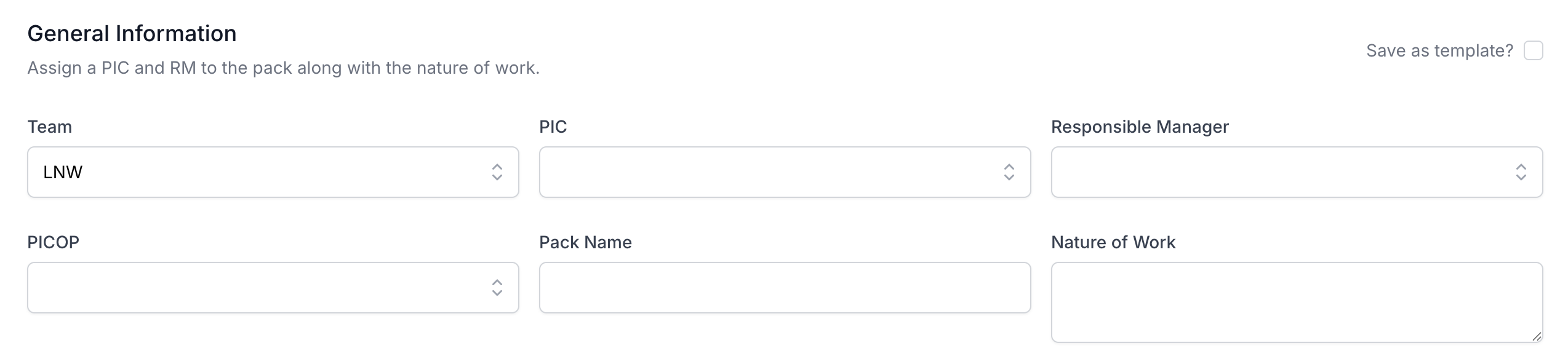
Assigning PIC & RM
The Person in Charge (PIC) and Responsible Manager (RM) are crucial roles in any work on the railway. Here's what you need to know:
- PIC (Person in Charge): This individual is responsible for the safe execution of work on site and verifying the SWP.
- RM (Responsible Manager): The RM oversees the planning and overall management of the work and is responsible for authorising the SWP.
You can assign yourself to either the PIC or RM role, but not both simultaneously.
To assign roles:
- Use the dropdown menus to select the PIC and RM.
- If you're assigning yourself to one role, the system will automatically prevent you from selecting yourself for the other.
Team Assignment
Assigning a team to your SWP helps with reporting and organisation:
- Purpose: Teams help attribute packs to the right group for better organisation and reporting.
- Benefits: Makes it easier to filter and track SWPs by team, improving workflow management.
- Usage: Select the appropriate team from the dropdown to ensure the SWP is categorised correctly.
PICOP Assignment
If your organisation uses PICOPs (Person in Charge of Possession), you can add them to your SWP:
- PICOP Field: When PICOPs are available in the system, this field allows you to assign them to the SWP.
- Integration: This ensures proper coordination between work activities and possession management.
- Visibility: Having PICOPs assigned helps with overall planning and safety coordination.
Pack Name
The Pack Name is a crucial identifier for your SWP. Here's why it's important and how to use it effectively:
- Purpose: The Pack Name gives your SWP a unique identifier for easy reference in the list view.
Best practices:
- Make it descriptive yet concise.
- Include key information like location, date, or type of work.
- Use a consistent naming convention across your organisation or team for easier sorting and searching.
Example: "Bridge Inspection - Paddington - Aug2023"
Remember, a well-chosen Pack Name can save time when managing multiple SWPs.
Nature of Work
This field describes the type of work being undertaken. It's crucial for quickly understanding the scope of the SWP. Here are the key points:
- Minimum requirement: The description must be at least 4 characters long.
- Be specific: Clearly state the primary task or purpose of the work.
- Abbreviations: Some common abbreviations are recognised, but be cautious with their use.
Examples of good Nature of Work descriptions:
- "Track Renewal"
- "Signal Maintenance"
- "Vegetation Management"
- "Bridge Inspection"
Tips for effective Nature of Work descriptions:
- Use industry-standard terminology where possible.
- Avoid overly broad descriptions like "Railway Work".
- If multiple tasks are involved, focus on the primary purpose of the shift.
By providing clear and accurate information in these general fields, you set the stage for a well-structured and easily manageable Safe Work Pack. This information helps everyone involved in the work to quickly understand the basics of the task at hand, improving communication and safety.