Planners
Creating a Pack - Task Risks
The Task Risks section in Accurail is a crucial component of your Safe Work Pack (SWP), designed to identify, communicate, and mitigate potential hazards specific to your work. This information is for the F01 Risk Control Briefing and PIC Acceptance. Let's explore how to effectively use this feature:
Understanding Task Risks
Task Risks are the potential hazards and dangers associated with the specific work you're undertaking. Unlike general site hazards, these are directly related to the tasks your team will perform.
Inputting Task Risks
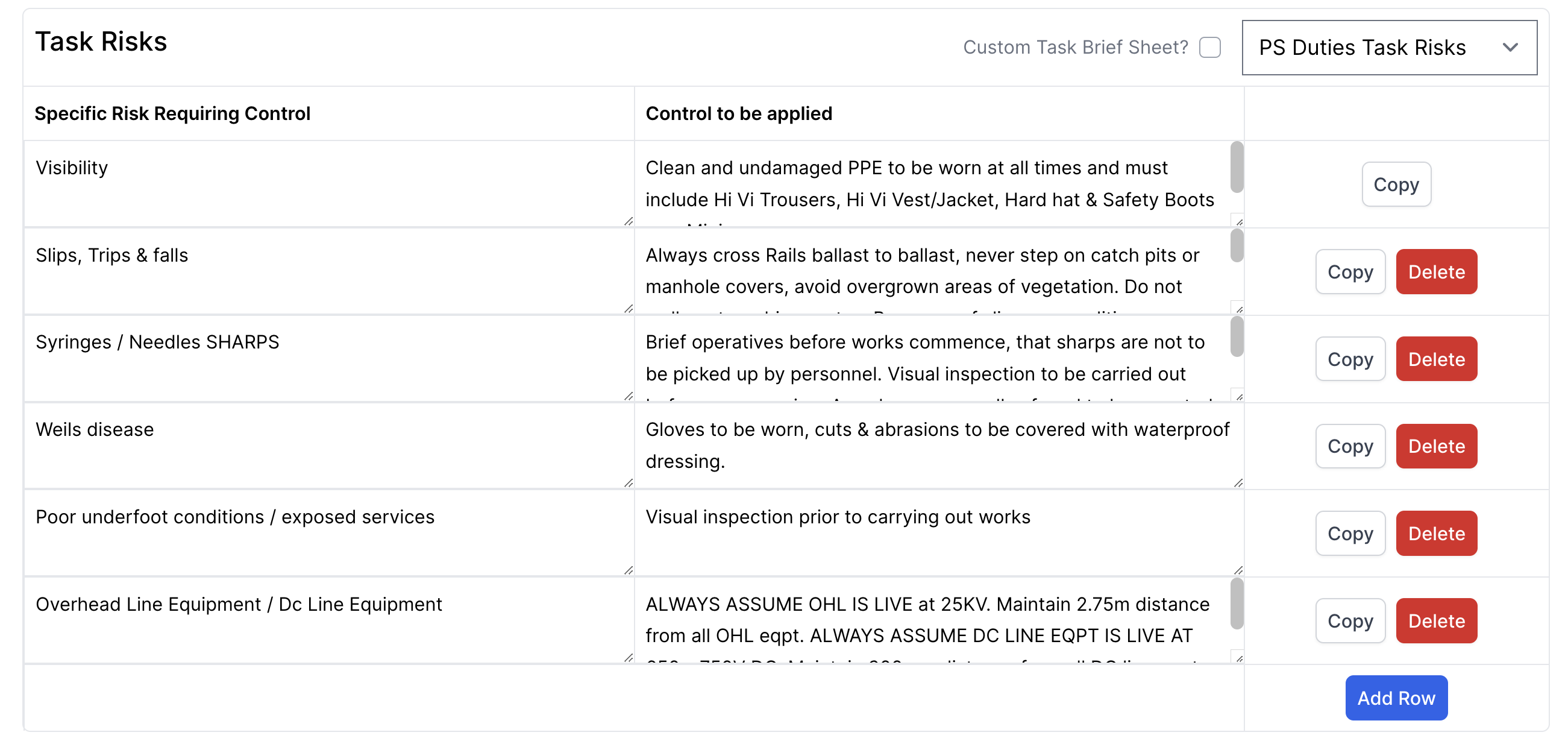
Minimum Requirement:
- You must enter at least one row of task risks.
- Each entry requires a minimum of 3 characters.
Risk Description:
- Clearly describe the potential risk or hazard.
- Be specific to your task and work environment.
Control Measures:
- For each risk, detail the measures to be taken to mitigate or control it.
- These should be practical, effective, and easily understood by all team members.
Creating Entries:
- Enter your specific risk description and corresponding control measures directly in the text fields.
- Ensure entries are clear, concise, and use standard terminology where possible.
Managing Presets:

- You can create your own custom presets by clicking the 'Save Preset' button after entering your risk and control measure text.
- Previously saved presets can be accessed via dropdowns in the risk and control measure fields.
- Presets help ensure consistency across your SWPs and save time when planning similar types of work.
Best Practices for Task Risks
Be Specific: Avoid generic risks. Instead of "Falling objects", use "Risk of tools falling from height during overhead work".
Link to Your Work: Ensure each risk is directly related to the tasks mentioned in the SWP.
Practical Control Measures: Provide control measures that can be realistically implemented on-site. Example: For the risk "Exposure to noise from power tools", a control measure could be "Wear appropriate ear protection and limit exposure time to 30-minute intervals".
Consider All Stages: Include risks associated with setting up, performing the work, and clearing the site.
Use Clear Language: Avoid jargon or overly technical terms. Ensure all team members can understand the risks and controls.
PIC and Delegated COSS Responsibilities
- The Person in Charge (PIC) or Delegated Controller of Site Safety (COSS) will need to sign against each task risk.
- This signature confirms that they understand the risks and will implement the control measures.
- Ensure your PIC or Delegated COSS is aware of this requirement and prepared to review each risk thoroughly.
When Task Risks Are Not Applicable
In some cases, you may not need to detail specific task risks in this section. If this is the case:
- Enter "Refer to TBS" (Task Briefing Sheet) in both the risk and control measure boxes.
- Ensure you have a comprehensive TBS prepared and included in your SWP.
Building Your Preset Library
As you create more SWPs:
- Save commonly used risk and control measure combinations as presets using the 'Save Preset' button.
- Build up a library of organisation-specific presets that reflect your typical work activities.
- This will help standardise risk assessments across your organisation and save time in future SWPs.
Why Accurate Task Risk Assessment Matters
- Safety: Identifying and controlling task-specific risks is crucial for preventing accidents and injuries.
- Legal Compliance: Thorough risk assessments are often a legal requirement in railway work.
- Efficiency: Well-understood risks and controls lead to smoother, more efficient work execution.
- Training: The task risk section can be a valuable tool for training new team members on job-specific hazards.
Remember, the goal of the Task Risks section is not just to comply with regulations, but to genuinely improve safety and awareness among your team. Take the time to make your risk assessments thorough, relevant, and easy to understand.