Planners
Creating a Pack - Signal Box & ECO Information
Providing accurate information about Signal Boxes and Electrical Control Operators (ECOs) is crucial for effective communication and safety during railway operations. Accurail offers a comprehensive system for inputting this vital information. Let's explore how to use this feature effectively:
Using the Signal Box / ECO Feature in Accurail
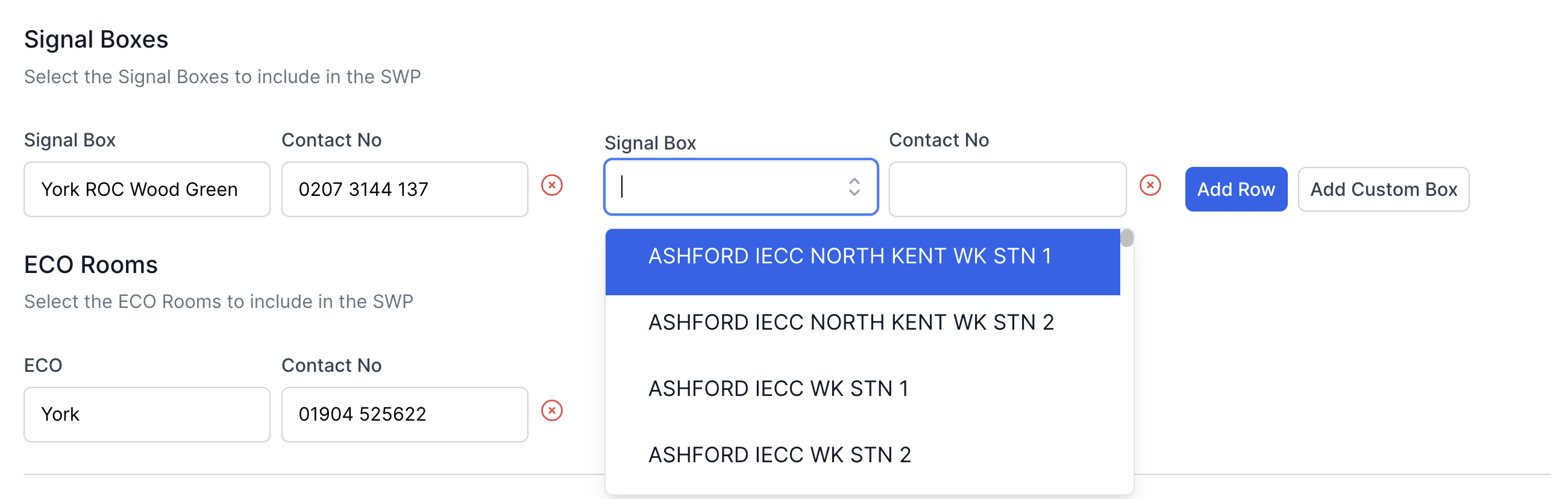
Signal Box section with dropdown open
Accurail aims to simplify your workflow by pre-populating Signal Box information:
When you enter location details, the system automatically suggests relevant Signal Boxes.
This pre-population is based on the most up-to-date information available in our database.
While pre-population is convenient, it's crucial to verify this information against relevant documentation.
Searching for Signal Boxes / ECOs:
- Click on the dropdown menu to see a list of pre-populated options.
- Use the search function to filter through the list quickly.
Adding Multiple Entries:
- If your work involves multiple signal boxes or ECOs, use the "Add Row" button.
- This allows you to add as many relevant signal boxes or ECOs as needed for your work.
Custom Entries:
- If you can't find the required signal box or ECO, or if the information is out of date, use the "Add Custom Box" option.
- This opens a free text field where you can enter the necessary information.