Company Map
Suggesting Edits to Map Assets
If you notice that an existing asset on the map is out of date - the type has changed, the severity is different, or the location details are inaccurate - you can suggest an edit. Your suggestion goes through the same review process as new submissions, so the original asset remains unchanged until an approver accepts your proposed changes.
How to Suggest an Edit
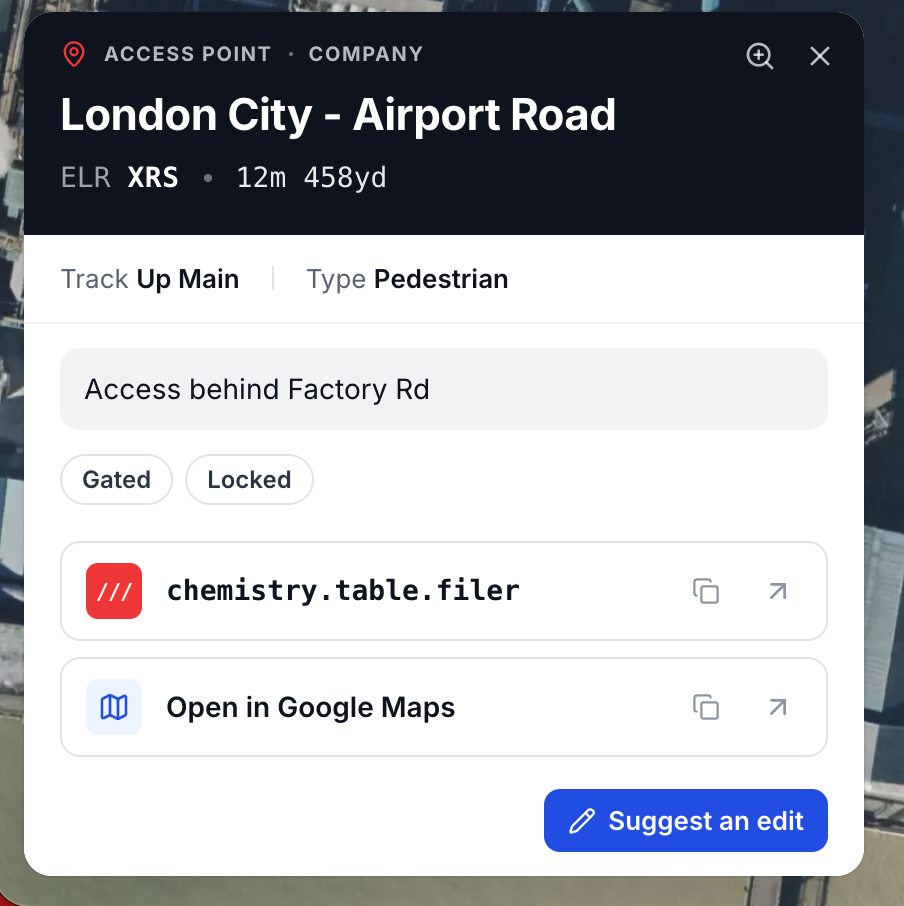
- Tap or click the asset marker on the map to open the detail panel.
- Click Suggest an edit in the detail panel.
- The edit form opens pre-filled with the asset's current values.
- Change only the fields that need updating.
- Submit the form. Your suggestion enters the review queue under the Suggested Edits tab on the Manage Submissions page.
Owner of a Pending Asset
If you submitted an asset and it is still Pending, you will see an Edit button instead of "Suggest an edit". This lets you modify the submission directly without going through the approval process. Once approved, changes revert to the suggested edit flow.
What You Can Edit
You can suggest changes to any field on the asset, including:
- Name
- Type (e.g. change from Pedestrian to Vehicle access)
- Severity (hazards only)
- Description
- ELR and mileage
- GPS coordinates
- Tags
- Photos
After Suggesting an Edit
The original asset remains visible and unchanged on the map until an approver accepts your suggestion. You can see the status of your suggested edit by tapping the asset marker - the detail panel will indicate a suggested edit is under review.
If your suggestion is rejected, you will see the rejection reason in the detail panel, which you can use to refine and resubmit if needed.